> ## Documentation Index
> Fetch the complete documentation index at: https://docs.interviewflowai.com/llms.txt
> Use this file to discover all available pages before exploring further.
# Candidate report
> Review a Candidate's scores, AI analysis, recording, transcript, and trust score in one place.
The Candidate report shows everything from a Candidate's interview. Open it by clicking a Candidate on an Interviewer's **Applicants** tab.
## Top of the report
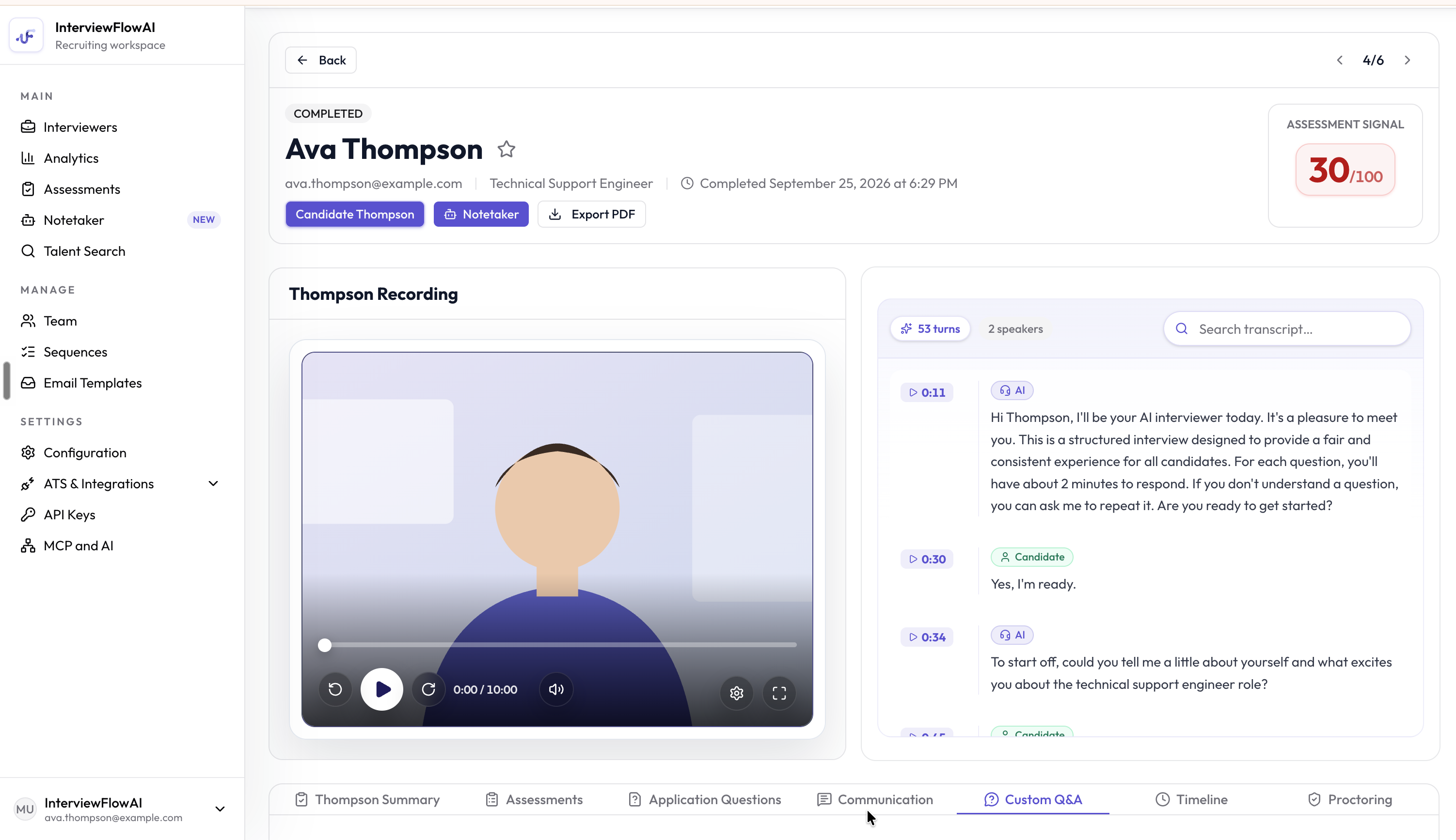 At the top, you see the Candidate's name, email, and current stage. From here you can:
* **Accept** or **Decline** a Candidate who is waiting for review.
* **Rate Candidate** with 1 to 5 stars.
* **Export PDF** to download the full report.
* Move to the previous or next Candidate with the arrow buttons.
If a Candidate retook the interview, switch between **Original** and each **Retake** to see every attempt.
## Report tabs
* **Interview Summary**: The AI's analysis of the interview, including **Strengths**, **Risks or Gaps**, skill scores, and the interview recording.
* **Assessments**: Results from any assessment the Candidate took.
* **Role Play**: Results from any role play the Candidate took.
* **Application Questions**: The Candidate's answers to your screening questions.
* **Communication**: How well the Candidate communicated, including grammar, vocabulary, and conversational flow.
* **Custom Q\&A**: The Candidate's answers and scores for your custom questions.
* **Timeline**: Each step the Candidate took, with dates and times.
* **Proctoring**: The trust score, with a score breakdown, signal overview, and detailed analysis of any unusual activity.
## Recording and transcript
Play the interview recording from the report. The transcript shows the full conversation. If the interview was in another language, switch between **Original Transcript** and **English Transcript**. Click a line in the transcript to jump to that point in the recording.
## Candidate details
Click **Candidate Details** to open a side panel with:
* **Notes**: Private notes visible only to your team.
* **Candidate Additional Fields**: Fill in values for your [additional fields](/configuration/candidate-additional-fields).
* **Resume Analysis**: The AI's review of the Candidate's resume.
* **Trust Score**: A summary of the proctoring results.
## Export the report as a PDF
Click **Export PDF** to download the report. The PDF includes a decision snapshot, strengths and risks, scores, answers, additional fields, trust score, and the transcript.
Only Owners can accept, decline, rate, add notes, or fill in additional fields. Viewers can read the report and export it.
This documentation is built and hosted on [Mintlify](https://mintlify.com), a developer documentation platform.
At the top, you see the Candidate's name, email, and current stage. From here you can:
* **Accept** or **Decline** a Candidate who is waiting for review.
* **Rate Candidate** with 1 to 5 stars.
* **Export PDF** to download the full report.
* Move to the previous or next Candidate with the arrow buttons.
If a Candidate retook the interview, switch between **Original** and each **Retake** to see every attempt.
## Report tabs
* **Interview Summary**: The AI's analysis of the interview, including **Strengths**, **Risks or Gaps**, skill scores, and the interview recording.
* **Assessments**: Results from any assessment the Candidate took.
* **Role Play**: Results from any role play the Candidate took.
* **Application Questions**: The Candidate's answers to your screening questions.
* **Communication**: How well the Candidate communicated, including grammar, vocabulary, and conversational flow.
* **Custom Q\&A**: The Candidate's answers and scores for your custom questions.
* **Timeline**: Each step the Candidate took, with dates and times.
* **Proctoring**: The trust score, with a score breakdown, signal overview, and detailed analysis of any unusual activity.
## Recording and transcript
Play the interview recording from the report. The transcript shows the full conversation. If the interview was in another language, switch between **Original Transcript** and **English Transcript**. Click a line in the transcript to jump to that point in the recording.
## Candidate details
Click **Candidate Details** to open a side panel with:
* **Notes**: Private notes visible only to your team.
* **Candidate Additional Fields**: Fill in values for your [additional fields](/configuration/candidate-additional-fields).
* **Resume Analysis**: The AI's review of the Candidate's resume.
* **Trust Score**: A summary of the proctoring results.
## Export the report as a PDF
Click **Export PDF** to download the report. The PDF includes a decision snapshot, strengths and risks, scores, answers, additional fields, trust score, and the transcript.
Only Owners can accept, decline, rate, add notes, or fill in additional fields. Viewers can read the report and export it.
This documentation is built and hosted on [Mintlify](https://mintlify.com), a developer documentation platform.