> ## Documentation Index
> Fetch the complete documentation index at: https://docs.interviewflowai.com/llms.txt
> Use this file to discover all available pages before exploring further.
# Manage Candidates
> Change stages, accept or decline, rate, move, and reset interviews for your Candidates.
Open an Interviewer and go to the **Applicants** tab to manage its Candidates. Switch between **Table view** and **Kanban view** to see Candidates as a list or grouped by stage.
Only Owners can take the actions on this page. Viewers can see Candidates and reports but can't change them.
## Stages
Each Candidate sits in a stage, such as **Applied**, **Shortlisted**, **Completed**, or **Expired**. Stages for assessments and role plays appear when the Interviewer uses them. You can also see **Incomplete**, **In Progress**, **Declined**, and **Opted Out** when Candidates are in those states.
Click a stage tab above the list to see only the Candidates in that stage.
### Move a Candidate to a custom stage
Use the stage selector on a Candidate's row to move them to one of your [custom stages](/configuration/custom-stages). The selector becomes available once you add custom stages in **Configuration**.
## Accept or decline
Candidates who applied to a private Interviewer wait in **Applied** until you review them.
* Click **Accept** to shortlist the Candidate and send the interview invite.
* Click **Decline** to turn the Candidate down.
If you declined a Candidate by mistake, or their interview expired, open the actions menu on their row and click **Shortlist anyway** or **Shortlist again**.
## Rate a Candidate
Give a Candidate a star rating from 1 to 5 on their row or in their report. You can clear the rating at any time. You can filter by starred Candidates with [advanced filters](/interview-automation/advanced-filters).
## Row actions
Open the actions menu on a Candidate's row to:
* **Copy Interview Link**: Copy the Candidate's interview link to share it yourself.
* **Send Reminder Email**: Remind a Candidate who hasn't finished.
* **Add to role play**: Send the Candidate a role play.
* **Edit**: Update the Candidate's details before they complete the interview.
* **Reset Interview**: Let a Candidate who completed the interview take it again. This can't be undone.
* **Delete**: Remove the Candidate.
## Bulk actions
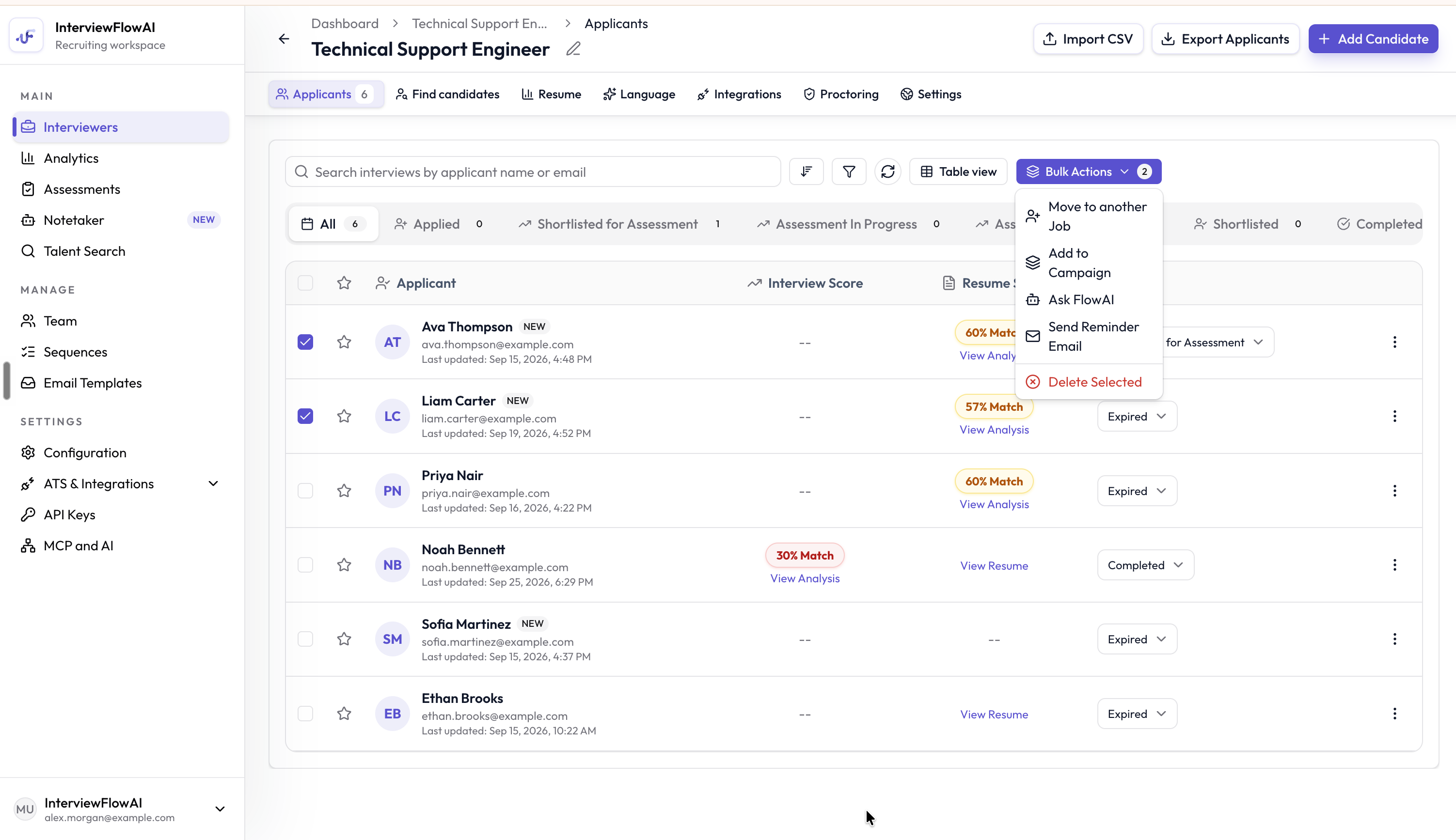 Select Candidates with the checkboxes, then click **Bulk Actions**:
* **Move to another Job**: Add the Candidates to a different Interviewer. Choose **Direct invite** to invite them right away, or **Just add to job** to add them without sending the invite.
* **Add to Campaign**: Add the Candidates to an outreach campaign.
* **Ask FlowAI**: Ask the AI assistant about up to 10 Candidates. See [Ask FlowAI](/interview-automation/ask-flowai).
* **Send Reminder Email**: Remind up to 100 Candidates at once.
* **Add to role play**: Send the Candidates a role play. See [Invite and review role plays](/role-plays/invite-and-review).
* **Delete Selected**: Remove the selected Candidates.
This documentation is built and hosted on [Mintlify](https://mintlify.com), a developer documentation platform.
Select Candidates with the checkboxes, then click **Bulk Actions**:
* **Move to another Job**: Add the Candidates to a different Interviewer. Choose **Direct invite** to invite them right away, or **Just add to job** to add them without sending the invite.
* **Add to Campaign**: Add the Candidates to an outreach campaign.
* **Ask FlowAI**: Ask the AI assistant about up to 10 Candidates. See [Ask FlowAI](/interview-automation/ask-flowai).
* **Send Reminder Email**: Remind up to 100 Candidates at once.
* **Add to role play**: Send the Candidates a role play. See [Invite and review role plays](/role-plays/invite-and-review).
* **Delete Selected**: Remove the selected Candidates.
This documentation is built and hosted on [Mintlify](https://mintlify.com), a developer documentation platform.